



Groups and broadcast lists
Communicate with teams through groups or send one-way updates through broadcast lists with no member limit.
Create your own Instant Messaging network in the cloud and manage it centrally from a web control panel
A familiar interface inspired by popular public apps so teams can start using IMBox immediately.
Access your account from multiple devices at once. Messages stay synchronized across Android, iOS, tablet, PC and Mac.
Find any user by name, surname or role without their phone number and start a chat instantly.



All messages and files are encrypted both in transit and at rest with AES 256-bit encryption.
Configure IMBox so only you can unlock the app with biometric authentication and receive login alerts.
Set mandatory two-factor authentication by SMS or email when signing in from a new device.
Communicate with teams through groups or send one-way updates through broadcast lists with no member limit.
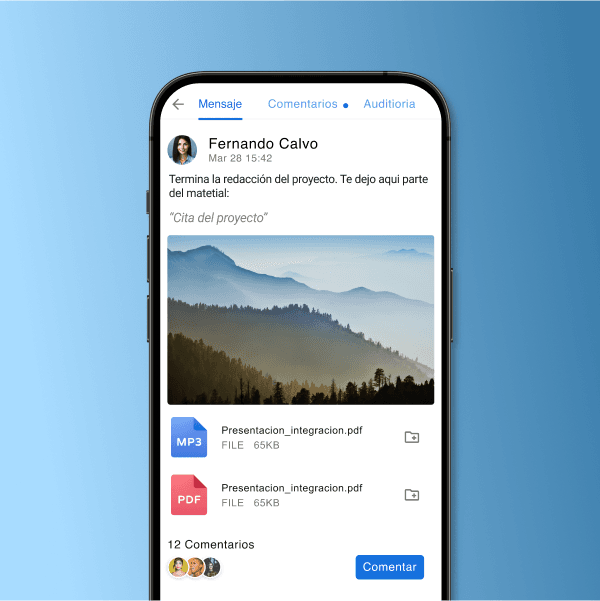
Create rich messages with images, files and text, and keep threaded comments separate from the main chat flow.
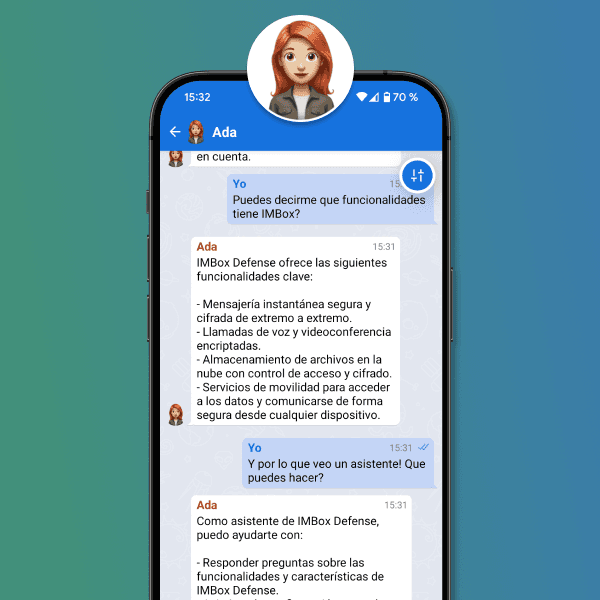
Resolve IMBox questions through a virtual assistant and extend that experience to your own customers.
Start encrypted calls directly from chat without a phone number. Find the user and call in one click.
Each group includes an associated conference room so meetings can start anytime without creating and sharing links.
Use advanced collaboration tools in every session: Share your desktop with every participant.
Start encrypted calls directly from chat without a phone number. Find the user and call in one click.
Each group includes an associated conference room so meetings can start anytime without creating and sharing links.
Use advanced collaboration tools in every session: Share your desktop with every participant.
Upload files to your private DRIVE and access them from any device, then share them quickly and securely.
Track delivery and download flows, and remove documents from the network to make them inaccessible to other users.
Organize files like folders from PC, share them in chats, review them from mobile, or remove them when they should no longer be available.


